
The timesheet that fills itself in
Old-style time and attendance lived or died by people remembering to sign in and out — so the total was never complete. MobyTime starts every day from each person's typical week, and real life amends it. Complete by default, corrected by exception.
Why timesheets were never complete
Ask any manager who has stared at a site's total hours: someone forgot to sign in, someone never signed out, someone worked from home and appears nowhere. When every recorded hour depends on someone remembering to do something, the picture is always missing pieces — and the payroll, the job costing and the answer to “what did last week actually cost us?” inherit every gap.
The template is the timesheet
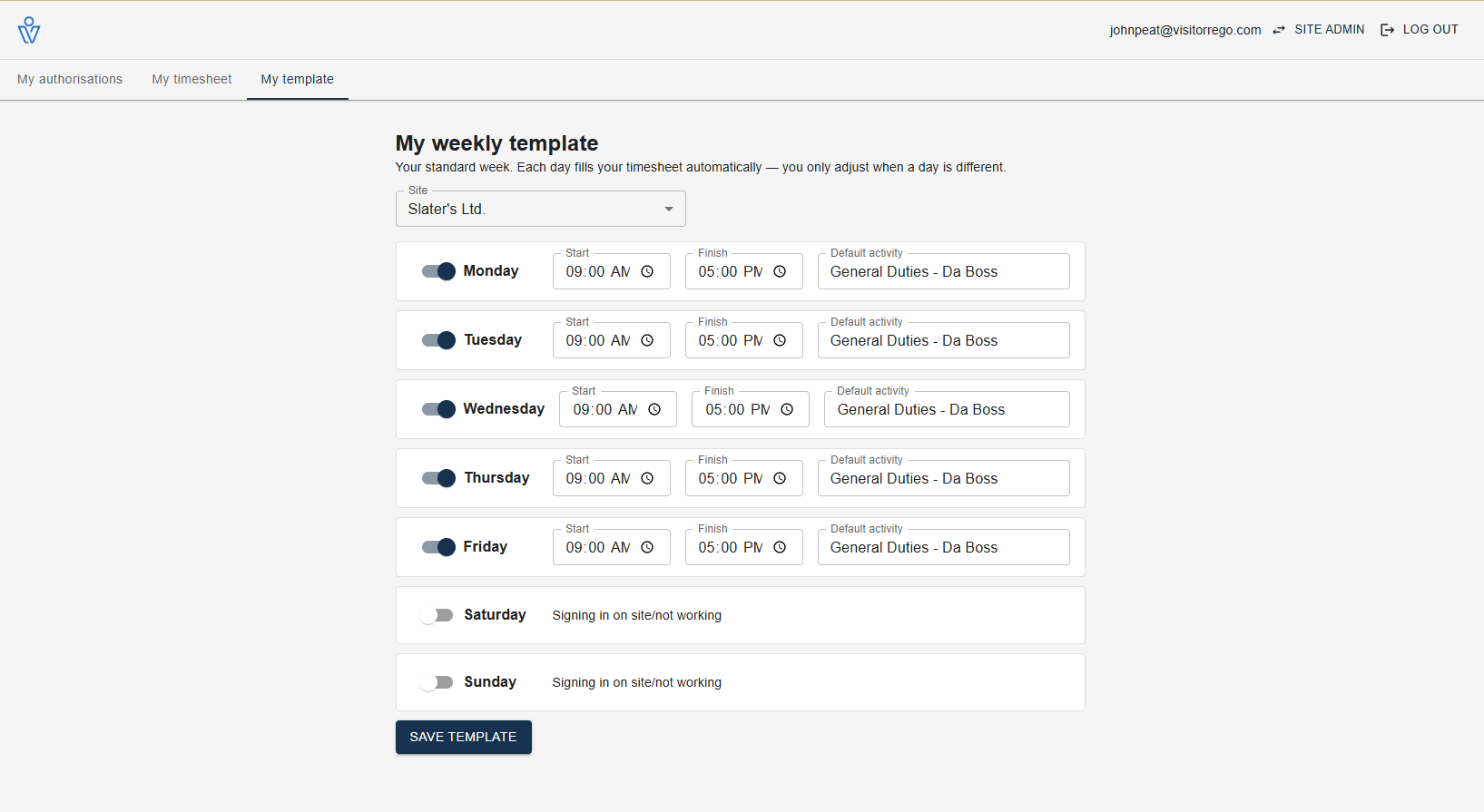
Set the typical week — once
Each person's template now describes real days, not just hours: start and finish, rest and meal breaks, even split shifts — and day templates roll into rotation patterns like 4-on-4-off. The time counts as their own “General Duties” by default, or any job you like.
Every day starts complete
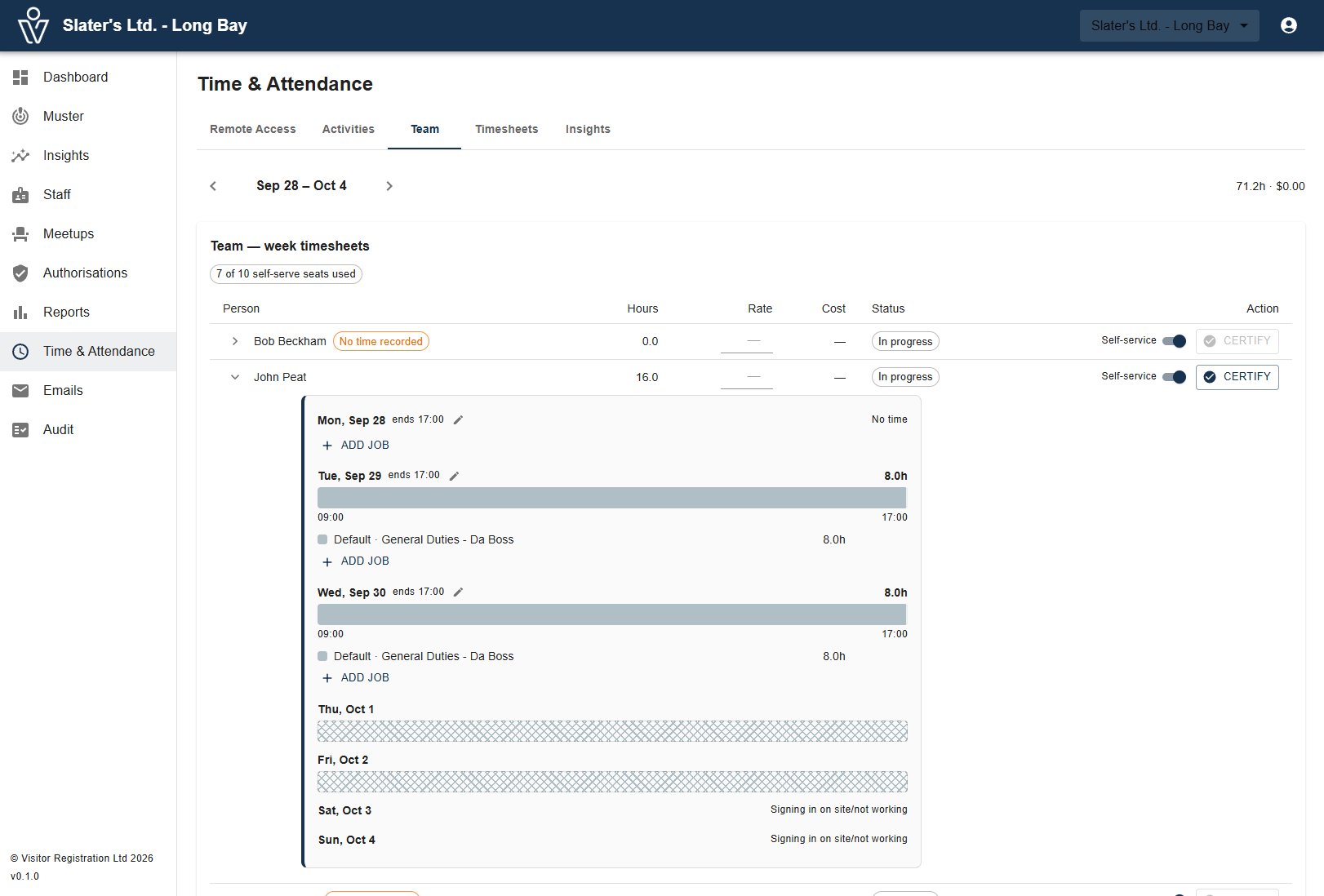
Each morning, the day's timesheet is already filled from the template. Nobody has to remember anything for the business to record their typical hours — the default is a complete week, not an empty one.
Real life paints over it
Signed in on site or remotely? The actual times take over and the template fills the gaps around them. Booked to a job for the afternoon? Paint it over the default. Finished early? Amend that day’s finish — the template itself never moves.
Do nothing, and the timesheet still shows the typical week. Do something, and it shows the truth.
Staff own their own timesheets
Every staff member gets their own self-serve portal: their template, and each day drawn as a ruler — the default hours as the baseline, each job painted over it in its own colour. They add jobs, book time to leave, sick, training or travel, correct their own signed-in times, and mark the week complete. Their timesheet, maintained by them — not a form reception chases at month end.
A self-serve seat is $1 per person per month.
Managers see a complete site, always
The Team view shows everyone's week the same way — every person, every day, already populated. Drill into any day's ruler, fix what needs fixing, then certify the week: certifying freezes the person's cost rate, so the numbers you signed off are the numbers that stay. Hours group by job and activity, so your biggest cost is finally itemised — and the whole thing exports straight to payroll.
Hours are not presence
One line we never blur: working remotely counts toward time, never toward who is on site. The muster list and the on-site view show only people physically there — so the duty-of-care picture stays true while the timesheet captures the work, wherever it happened.
Time, through a health & safety lens
Recording hours was never the whole job — the law also cares that people take their breaks, that someone notices when a shift runs long, and that the person rostered on Saturday actually holds the ticket for the work. The same timesheet spine now carries all of it.
Breaks, by the book
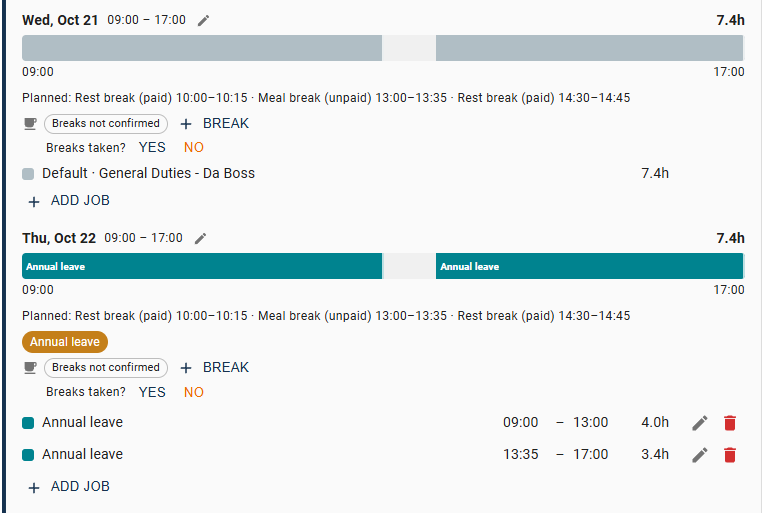
Day templates now plan rest and meal breaks — and split shifts — not just start and finish. Staff capture breaks with one tap on their phone, or confirm them as they sign out. Your site's break rules come as NZ (Employment Relations Act) and Australian presets, and every day quietly flags whether its breaks were taken, short, or missed.
Someone's watching out
Optional welfare alerts watch every live session: a nudge when a break is overdue, a welfare check when someone is still signed in long past their finish, and regular check-ins for lone workers — each one escalating to your nominated contacts if it goes unanswered.
Leave and holidays, planned in
Leave types, requests and approvals live in the same two portals — staff ask from theirs, managers approve from Team. Approved leave and public holidays flow straight into the timesheet as planned hours, so a week with leave in it is still a complete week.
A roster that knows who is qualified
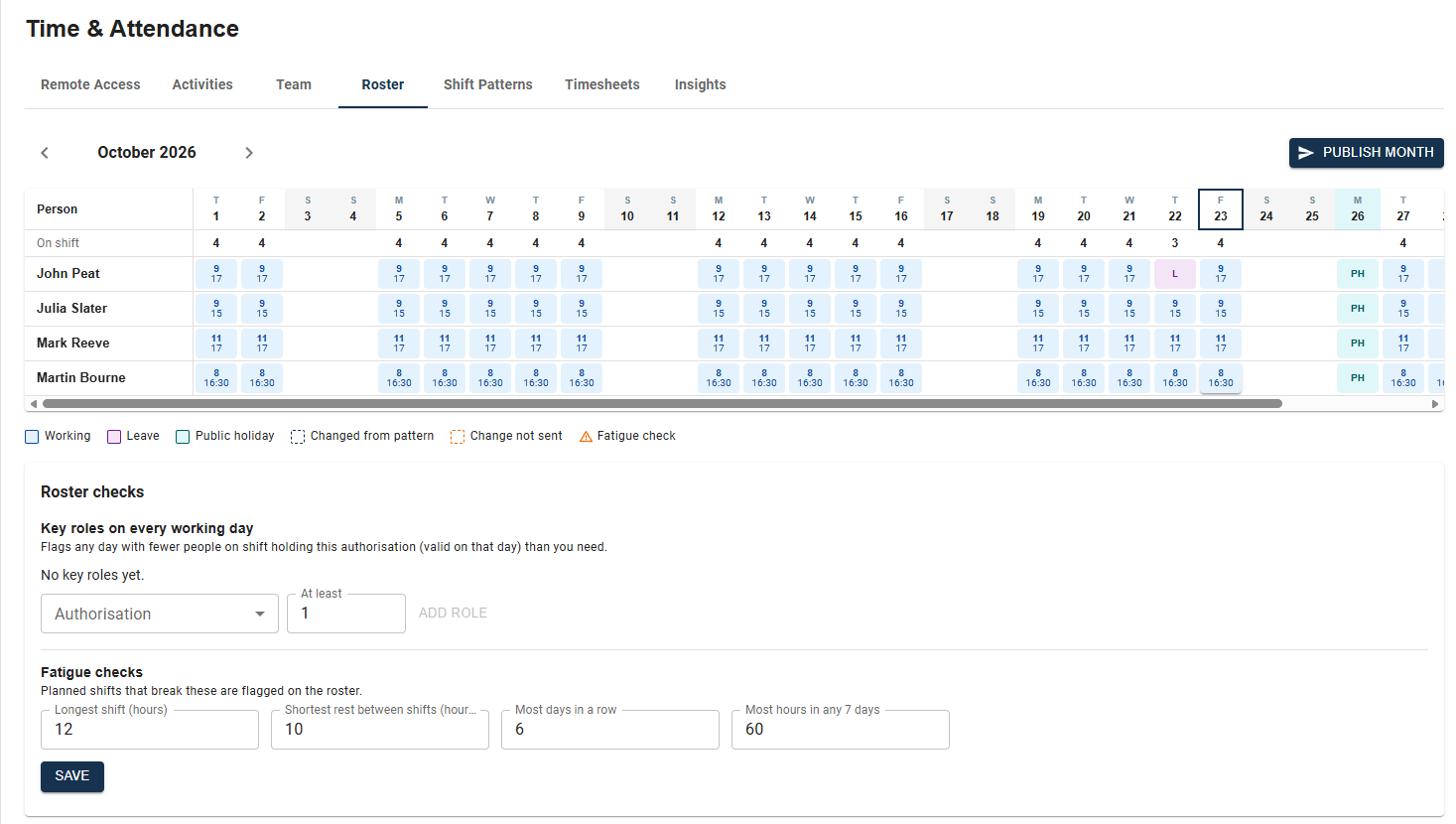
Plan the month ahead: rotation patterns like 4-on-4-off, coverage at a glance — and the gaps you can't see anywhere else: days where nobody rostered holds the required certification, straight from Site Access authorisations. Fatigue guardrails (longest shift, shortest rest, days in a row, hours per week) check the plan before you publish — and publishing tells everyone their days.
Everything MobyTime does
Built on the same person spine as Site Access — one identity for access, certification and time.
A typical week per person
The template: days, hours and a default activity — free-text, starting from their job title.Complete by default
Every day auto-populates from the template. An untouched timesheet is a complete one, not an empty one.Real sign-ins take over
On-site and remote sign-ins flow straight in and override the default — actual beats typical, automatically.The day as a ruler
The default hours are the baseline; each job is painted over it in colour. A day you can read at a glance.Jobs, leave and training
Your own job numbers and cost centres, plus leave, sick, training and travel — every hour lands somewhere.Early finishes
Left at midday? Amend that day’s finish. The day is right, and the template stays untouched.Certify and freeze
Certifying a week freezes the cost rate behind it — approved numbers never drift later.Payroll-ready export
Approved hours per person and activity, exported ready for your payroll system.Breaks that meet the law
Rest and meal breaks planned in the template, captured with one tap, and checked against NZ and Australian break rules — every day shows its compliance.Welfare check-ins
Overdue-break nudges, long-shift welfare checks and lone-worker check-ins — escalating to your contacts when unanswered.Leave & public holidays
Requested and approved in the same portals; approved leave and holidays land in the timesheet as planned hours.A roster with guardrails
Plan the month, see coverage and certification gaps, and let fatigue rules check the plan before you publish.See it in action
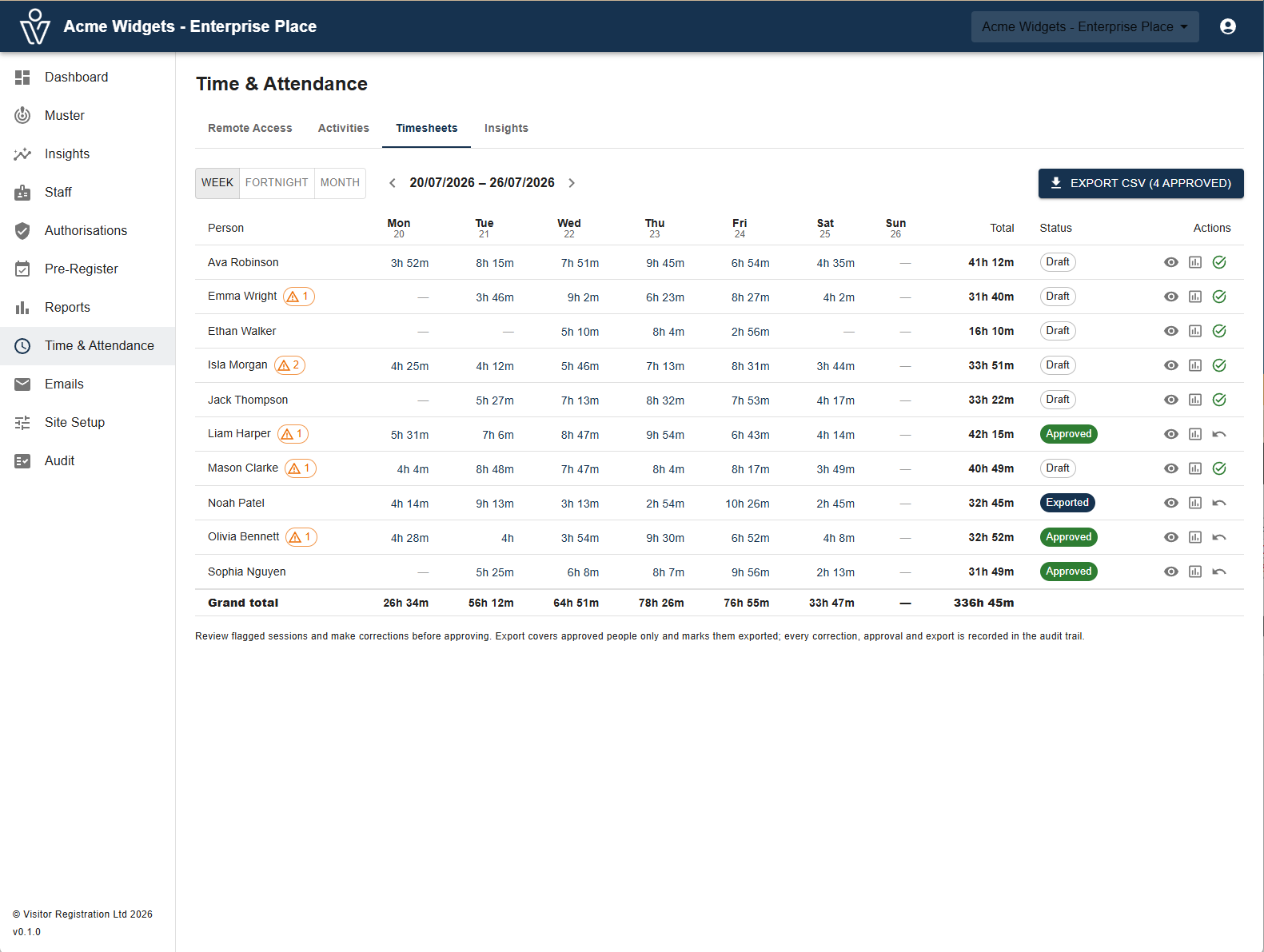
Timesheets
A week per person at a glance — flags to review, one click to approve, export to payroll.
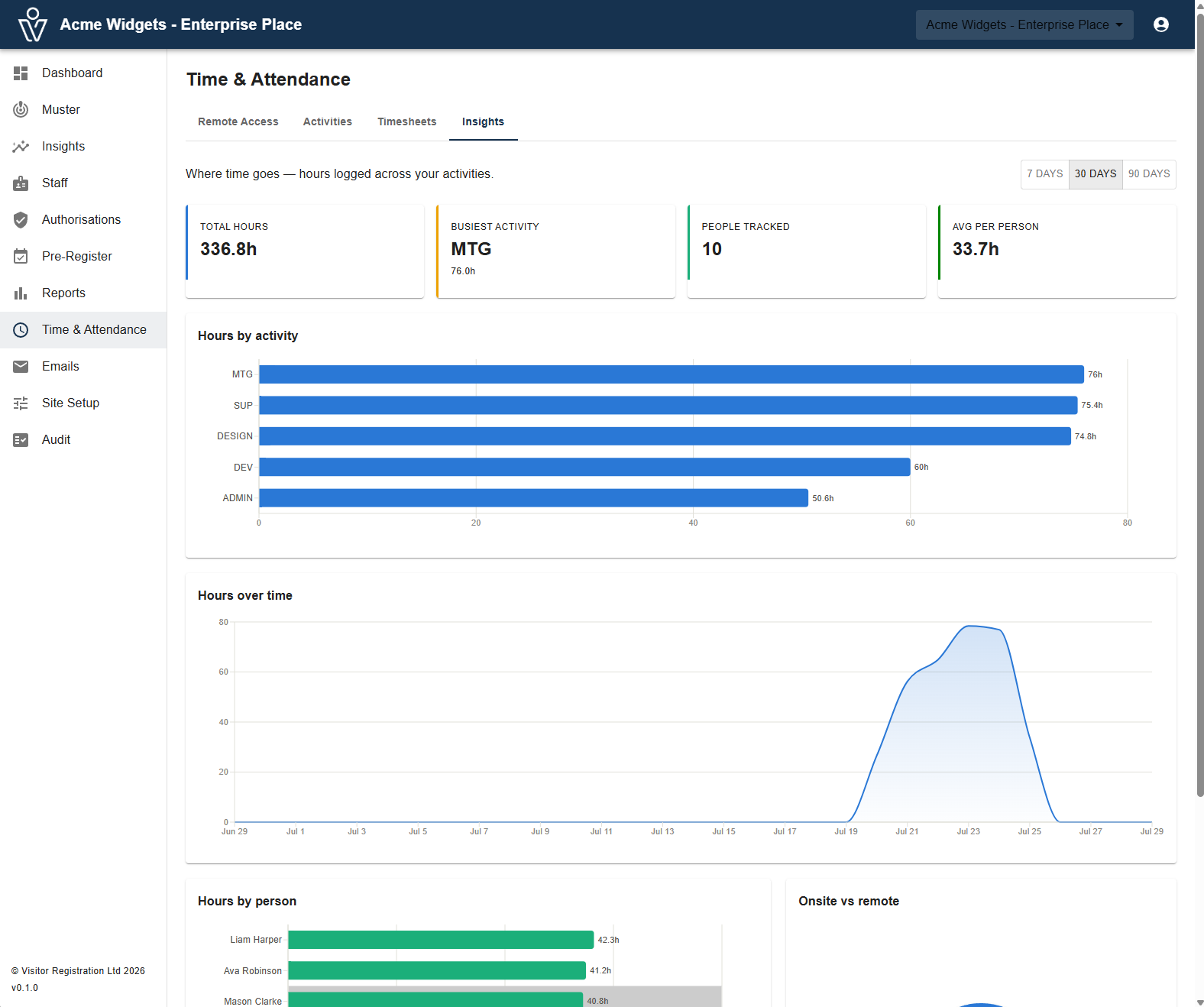
Where time goes
Hours by activity, by person, onsite vs remote — your biggest cost, itemised.
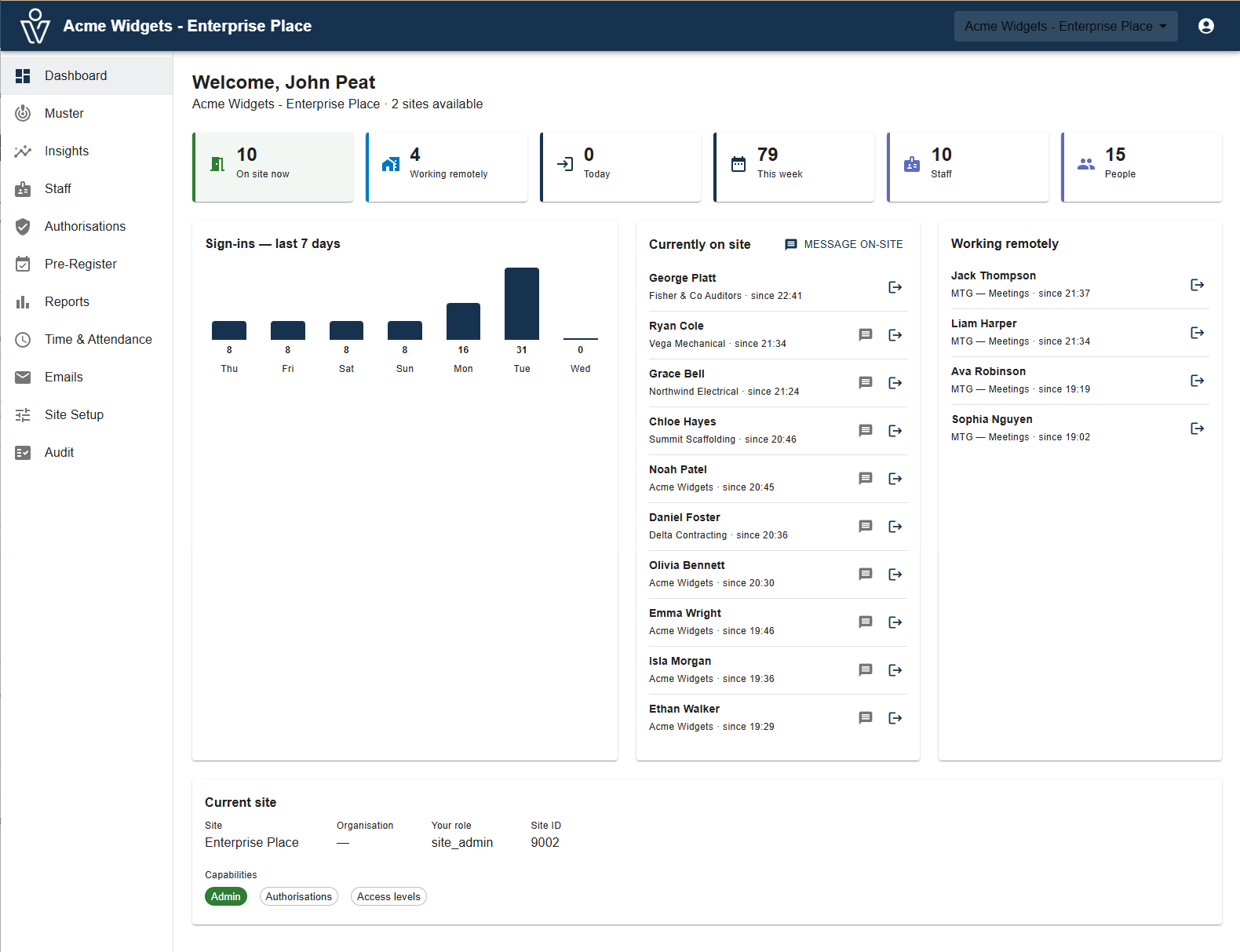
Your dashboard
Who’s on site, who’s remote, and the week’s sign-ins — live on one screen.